Author: Karolina Przespolewska
Does Generative AI truly help in Software Engineering? AI support using LLM models
Author
Gustaw Szwed – Senior Developer
Created
September 16th, 2025
This paper is in the form of a laid-back column, mostly personal opinions of mine. But first of all, I recommend reading our two previous articles – one from Krzysztof Dukszta-Kwiatkowski: Frontend developer perspective onusing AI code assistants and LLMs and one in the form of an interview with Łukasz Ciechanowski by Rafał Polański: AI and DevOps: Tools, Challenges, and the Road Ahead – Expert Insights. Now it’s time for another case study – a backend development perspective.
My environment and a bit about me
I’ve been working as a software engineer in multiple languages (not to mention dozens of frameworks, either). Now I stick with Reactive Java and Spring – wouldn’t call it my first choice, but so far, it’s the least painful and allows me and my team to deliver high-quality projects on time. And then – ChatGPT appeared with a big bang. As mentioned in the linked articles, it opened a new world for software engineers. This Pandora’s box also created many doubts in terms of Intellectual Property rights, like stealing artwork from artists through generative image AI.
How it all started
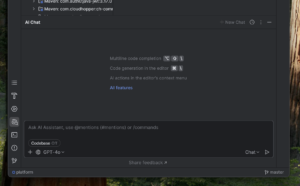
At the beginning, software engineers relied mostly on AI chatbots – where they provided some questions, code snippets and so on. Nowadays, those are often integrated in our IDEs – I use IntelliJ IDEA Ultimate with JetBrains AI Assistant Plug-in as my daily tools. I also tried other plugins like those provided straight from OpenAI – I guess everyone recognises their ChatGPT.

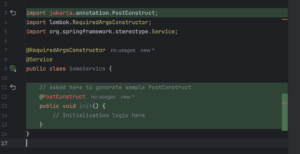
As you may see, it’s an integrated ChatBot. You can also change the LLM model to a different one – not only those from OpenAI (like GPT-4o), but also from Google (Gemini) or Antropic (Claude). It also allows you to generate code straight in your editor – but with varying results:

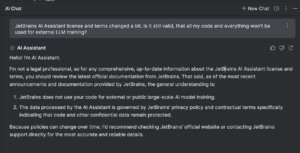
As you may see, it generated a sample straight from Jakarta EE (previously known as simply Java EE) instead of Spring’s PostConstruct, which comes straight from javax. On the contrary, when I have doubts while writing sophisticated Reactive chains, I can always ask an AI assistant for advice – and not only do I get some hints, but also it explains to me some steps and changes they made:

It allows engineers to refactor Reactive code with proper fallbacks (which is not that intuitive for starters), configure loggers (not only logback, but also allow to include Logbook), or when they want to generate some Java records based on a sample JSON (or vice versa), it does its job really well. The same thing happens with Jackson or Swagger annotations, so it really accelerates the software development. And it also has a great knowledge about many external APIs – KeyCloak user, role and group management? No problem. Oauth2 support, Kafka brokers, everything needed daily – it shows its potential. But with everything, there’s a pinch of tar – when I asked an AI assistant for some simple CSV file transformation when providing a table, it couldn’t understand how to manage some strings and just made up the results. Also, if a developer doesn’t know what they’re doing and relies only on AI assistants, they will quickly find out they are in a dark alley with AI-provided solutions that totally don’t make any sense.
Damage is done
Around all the controversies with not-so-legal fetched materials for learning LLM (large language models) or image generation models (like Stable Diffusion), it also allowed engineers like me to greatly increase productivity – but with some cost. LLM models are based on our existing content – repositories, Stack Overflow questions and replies, news, documentation and articles. If you want it or not, you’re part of it now, even if you opt-out (you can truly opt-out?). Obviously, you don’t have to use AI assistants too, but as you may see above, it accelerates coding, so there’s a chance you will stay behind. But even as a part of this trend, there’s still one big challenge ahead of us – degradation of input material for LLM models. Stack Overflow and other portals have seen dramatically decreased traffic, and that’s a really bad situation – no one can rate replies, review them, give some feedback or promote a given advisor to a higher rank.
We lost control
Those are bold words, but you will not find better words for that – we don’t control input nor output of LLM models, no one can guarantee that results aren’t made up, don’t come from unreliable (or what’s worse – shady) sources, won’t spoil someone’s Intellectual Property, etc.

But can you truly trust it? Of course, we use IntelliJ IDEA, WebStorm, Xcode and other IDEs, but it’s local and we can (at least theoretically) check the traffic that comes in and out from our Mac or PC. Now we don’t have any guarantees that our queries don’t flow around the globe.
Corporate policy
Some companies are afraid of that; therefore, they simply don’t allow engineers to use any AI assistant, which may be harmful for them. Their colleagues from other companies can now improve their work, for instance, help the DevOps team to provide Ingress rules (because they can learn it with an AI assistant in no time), and understand their code better. Every smart business on the market provides its own servers with LLM models. It’s not a perfect solution, it’s quite often not up-to-date with the newest versions of frameworks or libraries, and doesn’t allow (most often) to pick other LLM models like the JetBrains AI plug-in does. Maintaining those servers doesn’t come cheap, not only because of DevOps work, but also at a resource level – it requires a lot of disk space and computing power. But at least they’re in control, and that’s a trade-off they prefer to keep. There is also possibility to run LLM on local machines (vide Ollama, LM Studio or HuggingFace), but those require powerful work machines and for many engineers who just use their company laptop it may be too much (in terms of battery life and thermal considerations) – for more information I suggest to read article from Krzysztof Dukszta-Kwiatkowski mentioned at the beginning of this column.
They took our jobs!!!
That’s the biggest fear of engineers, which I totally don’t agree with. With or without the AI trend, the level of engineering skills has degraded in the past. As a technical recruiter, I noticed most engineers just came “to work”, whereas software engineering is way more. And they burn out quickly, don’t learn new things and follow new trends and technologies on the market, including new frameworks. I would rather work with two great engineers than with 10 average ones, because the knowledge sharing is really time-consuming and doesn’t move the project forward. In the past years, companies have been over-recruiting, so now only good engineers can find a great project to be part of, and for them, the AI assistant is a great tool to push those projects at a higher pace.
Conclusions
In summary, while AI assistants like ChatGPT have undeniably changed the way we approach backend development – speeding things up, filling knowledge gaps, and even acting like a second pair of eyes – they’re still just tools. Powerful, yes, but imperfect. As engineers, we have to stay sharp, question the output, and keep learning the fundamentals. Otherwise, we risk becoming over-reliant on something we don’t fully understand or control. The landscape is shifting fast, and it’s up to us to adapt thoughtfully, not blindly follow the trend.
Frontend developer perspective on using AI code assistants and Large Language Models (LLMs)
Author
Krzysztof Dukszta-Kwiatkowski
Created
June 24th 2025
Introduction
At our last all-hands meeting, my team and I initiated a broader discussion on the relevance of AI for our business. The conversation highlighted multiple perspectives:
- Offering professional services related to AI/LLMs,
- Integrating AI/LLMs tools into our daily work,
- Leveraging AI/LLMs in marketing, documentation, and communication materials.
This essay focuses on aspect (B), particularly on the use of GitHub Copilot and related tools
within Visual Studio Code (VSCode) from the perspective of a frontend developer.
Day-to-Day Use of Copilot in Frontend Work
As a frontend developer, I’ve integrated GitHub Copilot into my daily workflow in Visual Studio Code. It’s not a replacement for critical thinking or domain expertise, but it has become a reliable coding assistant, particularly effective for small, well-defined tasks. Over time, it has shifted from being a novelty to something I now use for routine work.
Where does the Copilot Help?
For narrow, syntactically demanding, or repetitive tasks, Copilot significantly improves both speed and decreases cognitive load. These are the core areas where it consistently adds value:
- Syntax Recall: Copilot often helps me recall exact JavaScript or TypeScript syntax when switching between libraries, especially around useEffect patterns, event handling, or Promise chains. Instead of looking up syntax or common idioms, I can just start typing a comment or function name, and Copilot fills in a plausible structure.
- Boilerplate Code: Whether it’s writing React components, styling with CSS Modules or Tailwind, or scaffolding forms and validation logic, Copilot provides solid boilerplate. Even if it doesn’t get it perfect, it gives a strong starting point that saves keystrokes and mental effort.
- API Familiarisation: When working with unfamiliar Node.js or browser APIs, Copilot acts as a lightweight exploratory tool. Typing a few descriptive lines is often enough to see a valid example, which I can refine. This is especially helpful with APIs like fetch, FileReader, Clipboard, Web Workers, or IntersectionObserver.
- Rapid Prototyping: For utility functions — like debounce/throttle, sorting logic, object transformations, or edge-case handling — Copilot frequently generates working drafts that are “good enough” to test quickly, then polish later.
How Does It Change the Development Flow?
When working on code, I would often context-switch to Google, Stack Overflow, libraries and tools documentation pages or internal docs – sometimes dozens of times per day. These interruptions, although short, added friction to the flow of coding. Copilot doesn’t eliminate this, but it reduces the number of micro-interruptions.
It acts like a probabilistic code index, constantly offering suggestions based on the local context of my project/s. It doesn’t “know” my code the way a human does, but it’s surprisingly adept at guessing the intent behind keystrokes, especially in familiar framework environments (like React or Next.js).
The experience is somewhat like moving from a card catalogue in a library to a smart assistant that not only fetches the right book but opens it to the page you’re probably looking for.
Net Gains
Since adopting Copilot, I’ve noticed a few clear improvements in my development process:
- Less context switching: I stay focused on my editor longer.
- Faster iteration loops: I can move from idea to prototype more quickly.
- Lower cognitive fatigue: Especially during repetitive UI implementation or wiring up known patterns.
- Better focus: By offloading low-level recall and routine typing.
Copilot is not magic, and it doesn’t write full apps or solutions for me. But for frontend work – particularly in the component-layer – it’s like having an intern who’s fast, tireless, and occasionally brilliant.
What It Doesn’t Replace
It’s important to note that Copilot isn’t a replacement for understanding technology stack, software architecture and craftsmanship, being up to date with daily used technologies and tools and reading documentation. It can hallucinate without letting the user know about it. It can suggest bad or suboptimal solutions. It can reinforce bad patterns. It doesn’t reason about facts, requirements, or events that haven’t been explicitly provided to it, which live in a human-to-human daily communication.
Drawbacks and Limitations
Despite the value, there are significant downsides that require attention and governance.
The Update Lag
A major challenge with AI code assistants and large language models (LLMs) is their reliance on static training data, which means they do not automatically stay up to date with the latest information. Every time new frameworks, libraries, APIs, or best practices emerge, these models require retraining – a costly and time-consuming process – to incorporate that knowledge. As a result, there’s often a lag between the publication of new developments and the model’s ability to assist effectively with them. This limitation makes it difficult to fully rely on AI assistants for cutting-edge technologies or the latest updates, especially in fast-moving fields like software development.
Skill Degradation
Over-reliance on AI suggestions can weaken foundational skills. Repetition is essential to mastery, and outsourcing that repetition may slow down real learning. It can lead to a situation where developers know how to use the tool but don’t understand the underlying logic of the code that they wrote. A key danger is false confidence. Devs may assume correctness because the output is syntactically clean, leading to bugs that go unnoticed until late-stage QA or even production.
Lack of Determinism
AI suggestions are probabilistic, not logically derived. LLMs generate code based on statistical likelihood, not factual correctness or logical verification. This leads to non-deterministic behaviour. Asking the same question twice may result in different answers.
Quality Assurance Still Necessary
AI-generated code may look correct, but it can contain subtle logic flaws. For production work, especially in teams, every suggestion must still be reviewed. This sometimes makes it faster to write code manually than to verify an AI-generated version.
Compliance and IP Risk
Tools like Copilot send code to cloud servers for analysis. This creates legal and reputational risk, especially in industries with high compliance requirements (finance, healthcare, defence). Even anonymised code can leak architecture or business logic patterns. Uploading such artefacts may breach contracts or compliance rules.
Cost Considerations
Tools like Copilot are not free, especially at scale. Each seat comes with a subscription cost. Furthermore, cloud-based inference adds latency and external dependency, while local models require substantial compute power and maintenance.
Shallow Understanding of Context
Copilot can understand current file contents and some project-level context, but often fails when deeper architectural awareness is needed. Its suggestions are limited by the visible scope and rarely consider higher-level design constraints.
Review Overhead
Suggested code still needs to be read, understood, and often rewritten. The time saved in typing is often lost in verification, especially in teams that prioritise clean code and sustainable architecture.
Not Ready for Complex Reasoning
AI tools can’t reason abstractly or make architectural decisions. They follow patterns
– they don’t innovate or critically evaluate trade-offs. They’re not ready to be used in core system design or as decision-makers.
Local LLMs and VSCode Agent Mode
To address compliance and cost concerns, the local large language models (LLLMs) can be used. Such tools can run locally but require powerful laptops or internal servers. These models don’t require uploading code to external servers and can be integrated with VSCode using extensions or agent-based interfaces.
Additionally, VSCode Agent Mode enables a more interactive collaboration between the
developer and the AI model, allowing multi-turn conversations, persistent context, and
deeper codebase understanding. These solutions are still maturing but show promise for
future enterprise-grade deployments.
Reflections on the Technology’s Maturity
This is still the early stage of AI coding assistants. Like all young technologies, they bring disruption, excitement, and uncertainty. The full impact on developer workflows, team
dynamics, code quality, and long-term maintainability is not yet clear.
Key open questions remain:
- Best practices are still evolving.
- Long-term impacts on code quality, developer skill, and team collaboration are not fully understood.
- Tooling is inconsistent, with frequent updates and shifting APIs/models.
- How will junior developers build expertise if they rely on AI too soon?
- How do we ensure that auto-generated code adheres to internal standards?
- What kind of auditing or traceability should exist for AI-generated contributions?
- Can AI tools evolve to support entire teams, not just individuals?
- What guardrails should organisations establish?
The analogy can be made to calculators replacing abacuses. Just like calculators, LLMs will likely become standard tools, but only when used with understanding, discipline, and clear responsibility. We’re at a point similar to the early days of version control systems or containerization – powerful tools, but still lacking universal norms and safety rails.
Conclusion
GitHub Copilot and similar tools offer real, measurable productivity gains – particularly for frontend developers working in a complex ecosystem of frameworks, languages, tools and often also touching backend and devops layers. They reduce friction and help focus on solving higher-level problems. But these tools must be adopted thoughtfully. They are not a replacement for critical thinking, team collaboration, or professional responsibility. Especially in regulated or client-sensitive environments, guardrails around usage are essential. As AI technology evolves, we must treat it not as a magic solution, but as a new kind of power tool: useful, fast, and risky – depending on how it is handled.